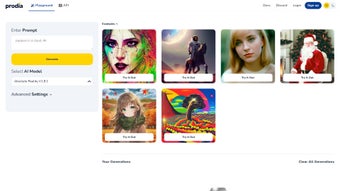

Download Prodia – Generative AI Image Creation Tool, Stable Diffusion API, Free & Secure
Overview & Core Capabilities
Prodia is a modern, JavaScript‑first AI platform that brings the power of Stable Diffusion to any developer, designer, or content creator with just a few lines of code. The service operates entirely in the cloud, meaning you never have to download massive model files or maintain GPU‑heavy infrastructure on your own machines. By exposing a clean RESTful API, Prodia enables you to request photorealistic, artistic, or stylized images on demand, receiving back a direct URL, JSON metadata, and optional low‑resolution previews.
This approach is ideal for a wide range of scenarios: embedding dynamic illustrations into web‑based design tools, auto‑generating game assets during build pipelines, creating custom graphics for marketing blogs, or even powering real‑time visual effects in mobile apps. Prodia’s pricing model is deliberately transparent – a generous free tier offers 100 images per month, while paid plans start at $9.99 for up to 10,000 images, making the solution scalable from hobby projects to enterprise‑grade workloads. Security is baked in through HTTPS encryption and token‑based authentication, ensuring that each request is authenticated and that usage quotas are enforced per API key.
Additionally, the platform respects data privacy by automatically deleting generated assets after 48 hours unless the user explicitly stores them elsewhere. In short, Prodia provides a secure, affordable, and developer‑friendly gateway to state‑of‑the‑art generative image creation without the operational overhead traditionally associated with machine‑learning deployments.
Key Features & Functional Highlights
Prodia’s feature set is designed to cater to both rapid prototyping and production‑grade integration. Below is a detailed overview of the capabilities that set Prodia apart from competing AI image services. Each feature has been carefully engineered to maximize flexibility, performance, and ease of use for developers across different platforms and skill levels.
- Stable Diffusion API Access: Utilizes the latest Stable Diffusion model, delivering high‑fidelity photorealistic and artistic renders with fine‑tuned control over style and composition.
- JavaScript‑First SDK: A lightweight, well‑documented SDK that abstracts the REST calls, handles authentication, retries, and response parsing, allowing developers to focus on creative logic.
- Scalable Cloud Infrastructure: Auto‑scaling clusters dynamically allocate resources based on request volume, guaranteeing low latency even during traffic spikes.
- Flexible Pricing Model: Free tier (100 images/month) for experimentation; tiered pay‑as‑you‑go plans starting at $9.99/month for up to 10,000 images, with bulk discounts for enterprise usage.
- Secure Token Authentication: API keys transmitted over HTTPS; per‑token quota enforcement prevents abuse and enables detailed usage analytics.
- Advanced Prompt Engineering: Supports positive and negative prompts, style modifiers, and seed control, giving users precise artistic direction.
- Real‑Time Preview Endpoint: Generates low‑resolution thumbnails instantly, allowing developers to preview results before committing to high‑resolution generation.
- Rich Metadata & Attribution: Each image response includes seed, steps, CFG scale, model version, and execution time, facilitating reproducibility and version control.
- Multi‑Platform Compatibility: Works seamlessly on Windows, macOS, Linux, Android, and iOS via any JavaScript‑enabled environment (browsers, Node.js, React Native, etc.).
- Comprehensive Documentation & Sandbox: Includes step‑by‑step guides, code snippets for popular frameworks, an interactive API console, and ready‑made Postman collections.
Installation, Usage & Compatibility
Getting started with Prodia is intentionally straightforward, whether you are a seasoned full‑stack developer or a newcomer to AI services. The process begins with account creation, proceeds through SDK installation, and culminates in a single API call that returns a fully‑qualified image URL. Below you will find an expanded walkthrough that covers setup, best‑practice configurations, error handling, and cross‑platform considerations.
Step‑by‑step installation and configuration:
- Visit the official Prodia website, register for a free account, and verify your email address.
- Log into the dashboard and generate a new API key. Copy this key; it will be the only credential needed for all subsequent requests.
- Open a terminal (macOS/Linux) or Command Prompt (Windows) and navigate to your project directory.
- Initialize a Node.js project if you haven’t already:
npm init -y - Install the Prodia SDK:
npm install prodia-sdk - Create a
.envfile at the root of your project and add your API key:PRODIA_API_KEY=your_key_here - Load environment variables in your code (using
dotenvor similar) and instantiate the client:import { ProdiaClient } from 'prodia-sdk'; import dotenv from 'dotenv'; dotenv.config(); const client = new ProdiaClient(process.env.PRODIA_API_KEY); - Generate an image with a single asynchronous call:
const result = await client.generate({
  prompt: "futuristic city skyline at sunset, ultra‑realistic",
  width: 1024,
  height: 768,
  steps: 30,
  cfgScale: 7
});
console.log('Image URL:', result.imageUrl);
console.log('Metadata:', result.metadata);
The SDK automatically handles request throttling, exponential back‑off on rate‑limit responses (HTTP 429), and parses the JSON payload into a convenient JavaScript object. For environments that do not support Node.js, Prodia also provides pure REST examples using curl and ready‑made Postman collections, making integration possible from Python, Java, or even low‑code platforms.
Compatibility: Because Prodia is a cloud‑based service accessed via HTTPS, it runs on any operating system that can execute JavaScript or make HTTP requests. This includes Windows 10/11, macOS Ventura and later, major Linux distributions (Ubuntu, Fedora, Debian), Android 8+ (through WebView or React Native), and iOS 13+ (via Safari or embedded WebViews). No native binaries or GPU drivers are required, dramatically simplifying cross‑platform development and deployment.
Best‑practice tips: Store your API key securely (never hard‑code it in client‑side code), enable usage monitoring in the Prodia dashboard to avoid unexpected costs, and consider caching generated image URLs when re‑using assets to reduce redundant calls. For high‑resolution production workloads, batch requests during off‑peak hours to take advantage of lower latency and potentially lower pricing tiers.
Pros, Cons & Frequently Asked Questions
Below is an in‑depth look at the strengths and trade‑offs of using Prodia, followed by a curated FAQ that addresses the most common concerns developers encounter when adopting a cloud‑based generative‑AI service.
Pros
- Easy JavaScript integration – ideal for web, mobile, and server‑side projects.
- Generous free tier lowers the barrier for experimentation and learning.
- Scalable cloud backend eliminates the need for GPU hardware or model maintenance.
- Secure token‑based authentication protects API usage and data privacy.
- Rich metadata (seed, steps, CFG scale) supports reproducibility and fine‑tuning.
- Real‑time preview endpoint speeds up iterative design workflows.
- Comprehensive documentation, sandbox console, and example code reduce onboarding time.
Cons
- Requires an active internet connection; offline generation is not possible.
- Currently limited to the Stable Diffusion model family; other architectures are not supported.
- Advanced prompt syntax (negative prompts, CFG scale) may have a learning curve for beginners.
- Higher‑resolution renders consume more credits, potentially increasing costs for heavy users.
- JavaScript‑centric SDK means non‑JS environments need a wrapper or direct REST calls.
- Free tier usage is capped at 100 images per month, which may be insufficient for rapid prototyping.
Frequently Asked Questions
What is the maximum image size Prodia can generate?
Prodia supports up to 2048 × 2048 pixels for standard plans. Premium plans can request larger dimensions, but each increase consumes additional credits.
Can I use Prodia for commercial projects?
Yes. All images generated under a paid plan include a commercial‑use license. The free tier is limited to personal or non‑profit use only.
How does Prodia handle data privacy?
All API traffic is encrypted via HTTPS, and Prodia does not store generated images longer than 48 hours unless you explicitly save them to your own storage. API keys are never logged.
Is there a rate limit for the free tier?
The free tier allows up to 30 requests per minute and 100 images per month. Exceeding these limits returns a 429 “Too Many Requests” response.
Do I need to install any local AI models?
No. Prodia runs the Stable Diffusion model on its own servers. You only need to send HTTP requests from your application.
Can I retrieve the exact seed used for generation?
Yes. The JSON response includes a “seed” field, allowing you to reproduce the same image later by re‑using that seed with identical parameters.
Review Summary:
Prodia offers a compelling blend of accessibility, performance, and cost‑effectiveness for developers seeking to integrate generative AI into their products. The JavaScript‑first approach, combined with robust documentation and a transparent pricing model, makes it an excellent choice for both small‑scale experiments and large‑scale commercial deployments.
Conclusion & Call to Action
Prodia strikes an impressive balance between power and simplicity. By exposing the Stable Diffusion engine through a clean, JavaScript‑centric API, it empowers developers of any skill level to embed generative‑AI image creation directly into their products. The free tier lowers the entry barrier, while the scalable paid plans ensure that growing teams can keep up with demand without worrying about infrastructure.
Security, documentation, and cross‑platform compatibility are handled out of the box, which translates to faster time‑to‑market for creative applications. If you’re looking for a reliable, cost‑effective way to add AI‑generated visuals to your workflow—whether it’s a design tool, a game asset pipeline, or a content‑marketing platform—Prodia is a compelling choice. Download Prodia today, generate your first image for free, and experience how generative AI can transform your creative process.



.png)



